The AI Roadmap for CTOs [2026]
9 Levels from Stack Overflow Replacement to AI-Only
TL;DR: Nine AI adoption levels guide CTOs from basic usage (replacing Stack Overflow) through AI-generated code with human review to fully AI-owned code and eventually AI-only solutions. Level 3 (everyone uses AI daily) is your first milestone - measure it before advancing. At each level, the CTO's job shifts: from removing friction and paying for licenses, to building prompt libraries and documentation for AI consumption, to defining guardrails for autonomous AI deployments. Match risk to capability - your CRUD endpoints can be at level 7 while payment processing stays at level 3.
The question every CTO faces: How do you migrate your engineering organization from classical software to AI-first - without breaking everything?
We’re heading into a future where classical software disappears. AI will do the jobs that code does today. This future might be years or decades away, but parts of it are happening now. I already use AI for most accounting - Claude Code classifies my invoices and loads them into financial software. No code, no IFs and THENs. Just AI.
Most organizations still write classical code. My coaching clients are overwhelmed by the road ahead. So are the CTOs and founders I’ve talked to over the last months. They don’t know where to start, what to measure, or how fast to push.
To help them plot a path forward, I developed these nine AI adoption levels. You go from level one (replacing Google search) to level nine (AI-only, no software).
The Nine Levels
- Using AI like Stack Overflow / Google
- Read-only Prompts for Analyzing Code
- Everyone Uses AI Daily
- Analyze Bugs, Suggest Solutions
- Generate Functions + Magic Cut & Paste
- Prototype First (with AI)
- AI Generates Code, Human Reviews
- Don’t Look at Code - AI Guardrails
- AI-Only / No Software
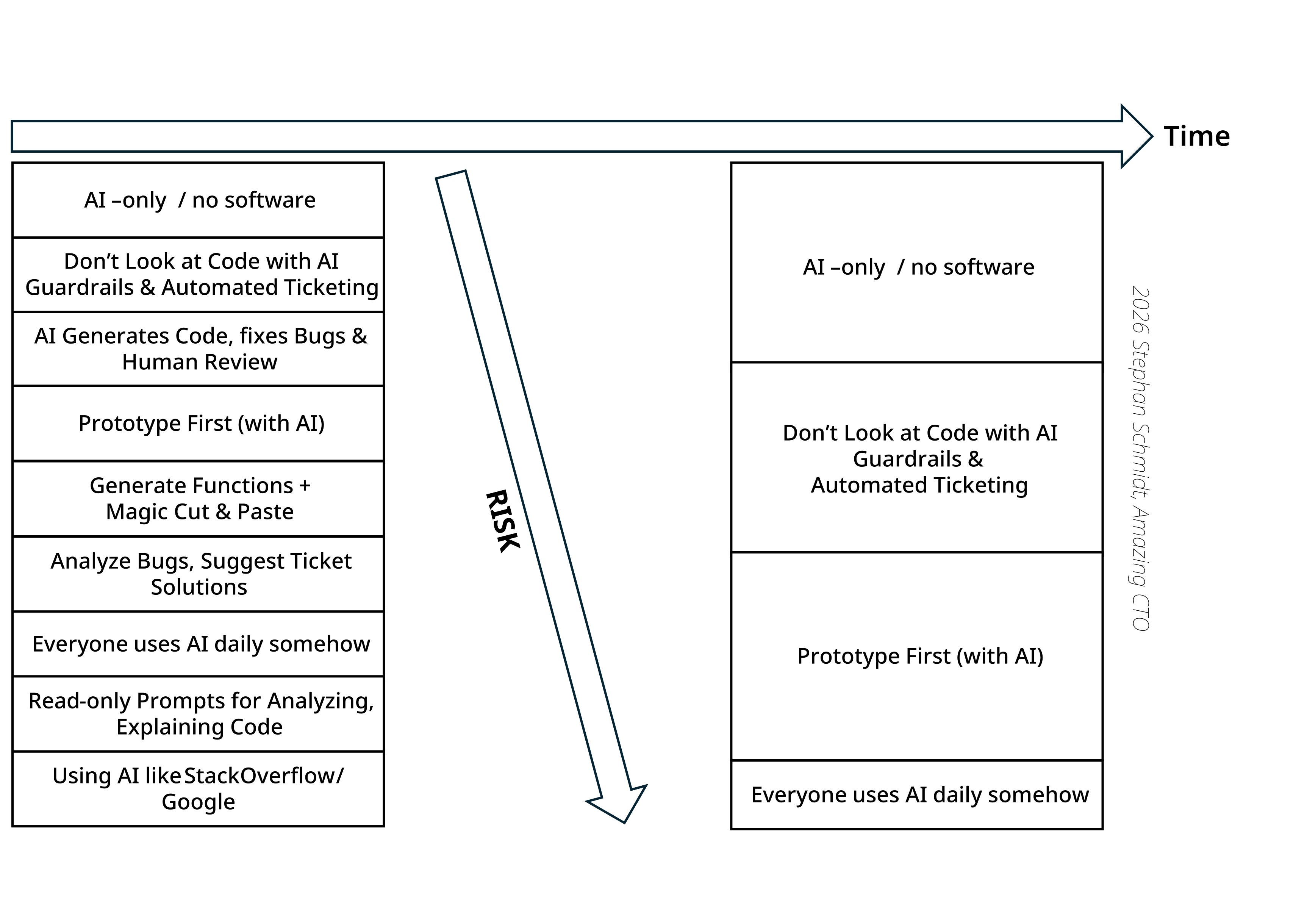
Level 1: Using AI like Stack Overflow
Instead of Googling or searching Stack Overflow, developers ask an AI how to implement a feature, use an API or framework, and to find a library. The AI doesn’t touch the code. Developers translate between their codebase and AI responses manually.
Your job as CTO: Remove friction. Pay for licenses. Make it acceptable to use AI. Express you expectations around AI usage. Deliver your vision for the future that takes developers with you. Some developers feel guilty or think it’s cheating - kill that mindset fast.
Use cases:
- “How do I implement X in Y framework?”
- Finding the right library for a task
- Understanding API documentation
- Debugging error messages (Copy and paste long type error messages into AI)
Level 2: Read-only Prompts for Analyzing Code
Developers use AI to analyze code for bugs, security problems, and performance issues. AI reads codebases, CI/CD configs, Terraform files, production settings. When developers move to unfamiliar code, they ask the AI to explain it.
Your job as CTO: Establish prompt libraries. Train your team on effective prompting. This is especially powerful for onboarding - new developers get up to speed in days instead of weeks.
Use cases:
- Understanding unfamiliar codebases / new microservices
- Navigating legacy systems
- Exploring alternative architectural solutions
- Faster onboarding for new hires or people switching teams
Level 3: Everyone Uses AI Daily
Your job as CTO: Measure this. Track AI usage across your team. If someone isn’t using AI daily, find out why. Tooling problem? Skill gap? Resistance? Fix it. If there is resistance work on your vision and communication. Where is the benefit to the developer using AI? If you haven’t made that clear, resistance will increase moving forward.
Use cases:
- All Level 1 and 2 use cases, but daily
- AI becomes the first place developers go for help
- Team shares prompts and AI workflows
- Team shares AI experiences and best practices
Level 4: Analyze Bugs, Suggest Solutions
AI finds bug causes and suggests fixes. AI reads tickets from Jira or Linear and proposes implementation plans - after reading the codebase and all documentation.
Your job as CTO: Documentation becomes critical. Not for developers - for AI. Everything in developers’ heads needs to be externalized. ADRs, architecture docs, runbooks, API descriptions. The why of the business, business requirements, technical constraints, If the AI can’t read it, it doesn’t exist.
Use cases:
- AI reads Jira/Github/Linear tickets and proposes implementation plans
- AI suggests the next ticket to work on
- Analyzing crash logs and stack traces to find root causes
- Diagnosing performance bottlenecks from metrics (connect AI to Application Performance Monitoring with MCP)
- Security vulnerability analysis with fix suggestions
Level 5: Generate Functions + Magic Cut & Paste
Another major milestone: AI writes code and developers trust it. AI generates functions, data objects, database mappings, simple controllers. Developers paste code and let AI adapt it to the place where it has been pasted.
Your job as CTO: Define boundaries. Which code can AI generate? Start with side-effect-free functions, data transformations, boilerplate. Keep AI away from security-critical paths until you build confidence.
Use cases:
- Autocomplete (Cursor, Copilot) - TAB, TAB, TAB - speeds up routine coding
- Generate unit tests from real code (get to 10% coverage manually before you let the AI write tests)
- Generate mock data for tests and UI previews
- Generate data for developers to work with (all usecases, registered user, paying customer, …)
- Boilerplate scaffolding (DTOs, config files, repetitive setup)
- Database queries, schema design, migration scripts
- Generate API endpoints (REST or GraphQL)
Level 6: Prototype First
The organization inverts its process. No more tickets and designs before code. AI creates working prototypes first. Stakeholders react to something real. Then AI generates the tickets and requirements.
Your job as CTO: This requires buy-in from product. Sell them on faster feedback loops. Prototypes in hours instead of sprints. Kill the waterfall of specs-then-code. This is a major step for developers from coders to product engineers.
Use cases:
- Create UI components from mockups and specs
- Full feature prototypes for stakeholder feedback
- Generate tickets and requirements after prototyping
Level 7: AI Generates Code, Human Reviews
AI does all the coding. Developers interact through specs and prompts, not writing code. After AI writes code, developers review everything. If you let the AI write code, you own the results. “The AI wrote this” is not a valid defense for a critical bug or incident. You generate it, you own it.
Your job as CTO: This is the last level of human-owned code. Invest heavily in code review skills. Have a training on what to look out for in AI code. Have a checklist. Your developers become editors, not writers. Different skill set. Some will thrive, some won’t.
Use cases:
- Refactoring - especially effective when paired with clear references and supported by tests
- Full feature implementation from specs
- Bug fixes with human code review
Level 8: Don’t Look at Code - AI Guardrails
We’ve crossed into AI-owned code. AI reads tickets, changes code, commits, deploys. Humans don’t review every line. Instead, you build guardrails: security checks, performance tests, compliance validation, tests. In this transition developers become creators and are no longer coders. To make decisions about the quality of code, take a look at the tests - let AI create a summary of what is tested to you. Are you confident?
Your job as CTO: This is where you earn your salary. Define the guardrails. What must pass before deployment? How do you catch AI mistakes? What’s your rollback strategy? Get this wrong and you’re on the front page. But here is where the explosion in productivity starts.
Use cases:
- Automated PR merging after AI-verified tests pass
- Automated bug fixing from production logs
- Automated bug fixing from tickets
- Self-healing production systems that fix issues autonomously
- Autonomous security patching within defined boundaries
- AI-driven feature releases gated by metrics, not humans
- One AI writes code, another model does the code review or writes the tests
Level 9: AI-Only / No Software
Software disappears as the primary tool. Instead of an ERP system, AI does ERP with tool integrations. Instead of a CRM sending emails, AI handles it directly. The implementation is irrelevant - only outcomes matter.
Your job as CTO: This is where the future catches up with you. Up until now most changes involved developers. No it is for you to change dramatically. You might no longer have a job. Or your job becomes defining outcomes and constraints, not building systems. We’re already seeing this in military drones. It will take some time, perhaps a decade, until it reaches you, but it will.
Use cases:
- AI-powered services instead of executing code
- AI-managed data pipelines that adapt to changing requirements
- Outcome-defined processes where the “how” is entirely AI’s domain
- “Expand to the US market”
What CTOs Need to Know
- Levels overlap. Each developer is at their own level. Some are ahead, some behind. That’s fine. Move the median up over time. No one can stay behind.
- Different code, different levels. Your CRUD endpoints might be at level 7 while your payment processing stays at level 3. Match risk to capability.
- Risk increases with level, but so do gains. Level 8 is dangerous if you get guardrails wrong. It’s also where productivity multiplies.
- Industry matters. Fintech, healthcare, avionics will lag behind. Consumer apps and internal tools will lead. Know where your industry is and where it’s going.
- Risk decreases over time. What feels dangerous today will be standard in two years. Within a decade, AI-only will be the default.
 Schedule a Welcome Call
Book your free 30-minute discovery call below. Let's talk honestly about your challenges and whether coaching is the right next step for you.
Current availability: Booking 2-3 weeks out for new coaching engagements
Where to Start
Assess your organization honestly. What level is your median developer? What’s holding back the laggards?
If you’re below level 3, that’s your only goal. Get everyone using AI daily before you worry about AI-generated code.
If you’re at level 3-4, start experimenting with level 5-6 on low-risk projects. Build confidence and case studies.
If you’re at level 5+, you’re ahead of most. Start thinking about guardrails and what level 8 looks like for your context.